- Feb 15, 2025
Login issues? Quick fixes and support
- Healing Wisdom
- Support Guides
1) Confirm you are on the right website
It is important to understand that Healing Wisdom maintains two website platforms:
www.healingwisdom.com — the main website with information about Healing Wisdom.
portal.healingwisdom.com — the Student Portal. This is where you access training resources, schedules, and Zoom links. To log in, click the "login" button at the top right of the page, or visit portal.healingwisdom.com/login.
ㅤ
2) Confirm your login credentials
When logging in, ensure that you are using the same email address you used to register for a training. Make sure it is typed exactly the same way as in the registration confirmation email.
ㅤ
3) Enter your verification code
When prompted during login, Podia (the platform hosting our Student Portal) emails you a 6-digit verification code to protect your account. This email is legitimate, and the code is valid for 30 minutes.
Keep the login page open. Do not close, reload, or navigate away from it. Check your email in a separate tab or on another device, then enter the code on the original login page.
Allow a few minutes for the email to arrive. Enter the code carefully, without extra spaces.
-
Use the latest code. Reloading the login page or starting again in another tab or browser generates a new code and invalidates the previous one. If your code has expired, restart at portal.healingwisdom.com/login to get a new one.
ㅤ
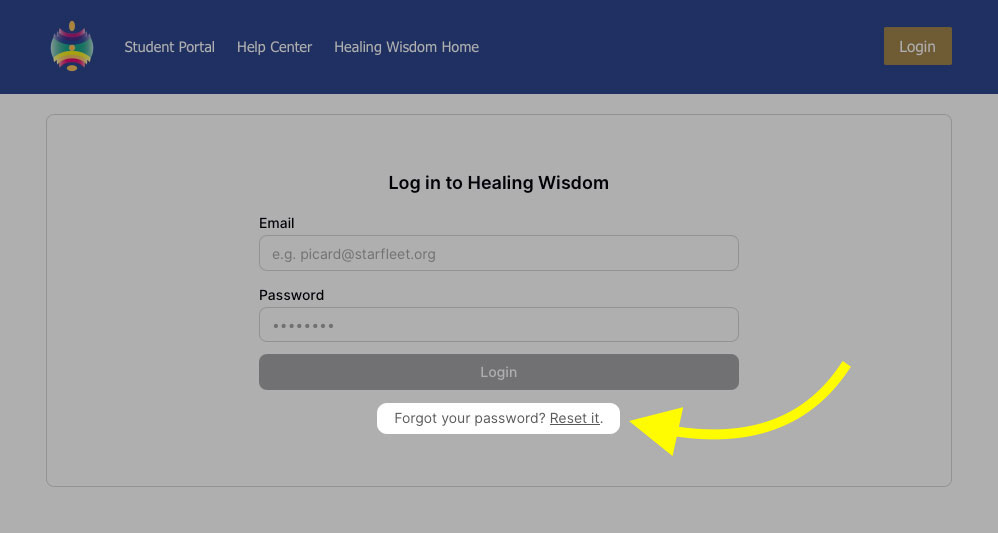
4) Reset your password
If your password is not recognized, you can reset your password on the login page.
ㅤ
5) Try a different browser
Sometimes, issues arise due to a specific browser such as:
Problematic browser extensions
Your browser's password autofill could be automatically entering an old password
Cookies and cache might be storing outdated information
Solutions:
Try a different browser
ㅤ
Still having issues?
If you have tried everything above and are still having issues logging in, don't hesitate to get in touch with us.
Email portal@healingwisdom.com with the following information:
Name and email address of the affected account
Training/event you are having issues with
Steps you have tried
Error messages/screenshots you are experiencing